

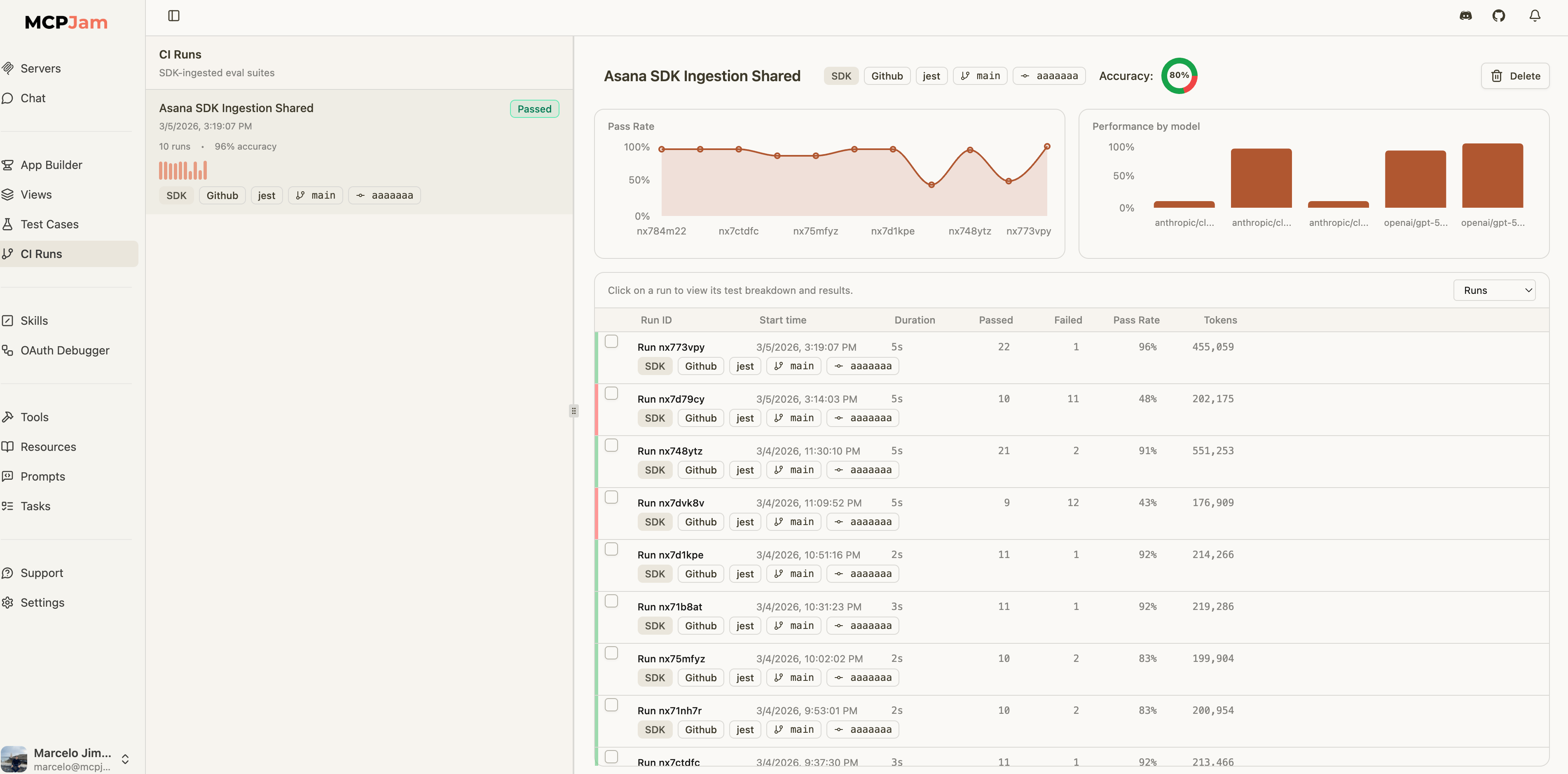
CI Runs page showing eval suite accuracy, pass rate trends, per-model performance, and more
Setup
Create an MCPJam API key (sk_…) under Settings → API keys and export it:
EvalTest and EvalSuite auto-save results when this key is available. Results land in the project named by MCPJAM_PROJECT_ID (or the project option in the mcpjam: config), falling back to your organization’s Default project.
After each successful upload the SDK prints a link to the run it just created, so you can open it straight from the terminal:
?project= param is omitted and when nothing prints at all.
Attach the connected MCPClientManager to HostRunner (or pass agent / mcpClientManager to manual reporting APIs) when you need either of the following:
- MCP App / widget replay in Evals traces — After each MCP App tool call, the agent uses the manager’s
readResourceto fetch HTML from the tool’sui.resourceUriand fillswidgetSnapshotsonPromptResult. Without the manager, traces still upload (messages + spans) but widgets will not replay in the dashboard. The tool’s JSON result alone is not enough for offline iframe replay. - Replay credentials (authenticated HTTP MCP) — The SDK can persist server connection details for debugging and reruns. You do not need to build a second secret object yourself; replay config is derived automatically when the agent or manager is attached.
Auto-Save from EvalTest
WhenMCPJAM_API_KEY is set, EvalTest.run() automatically saves results:
passed: false unless you set failOnToolError: false on the mcpjam object.
For authenticated HTTP servers:
Auto-Save from EvalSuite
Suites can be configured at construction or run time:EvalTest auto-saves are suppressed to avoid duplicate uploads. The suite consolidates all test results into a single run.
Automatic CI metadata
Whenci is omitted, the SDK reads available CI details from the environment. This works for EvalSuite, EvalTest, reportEvalResults, reportEvalResultsSafely, and createEvalRunReporter. API-key setup is still required.
The SDK also attaches available pipeline IDs, job IDs, and CI run URLs. Vercel attaches its deployment ID and Netlify its build ID; neither supplies a job ID or run URL through this detector. A deployed site’s URL is not used as a CI run link.
Detection requires the provider’s environment flag to be
true or 1; Jenkins uses a nonempty JENKINS_URL or JENKINS_HOME. If several providers match, the table’s order wins and their fields are never mixed. Local runs and unknown CI services add no automatic metadata.
Variables must be exposed to the test process. On Vercel, enable access to system environment variables. Missing or invalid values are omitted: automatic fields are limited to 512 characters, run URLs must be HTTP(S), and commit values must be full Git hashes. For example, Buildkite’s unresolved HEAD is omitted. GitHub uses the existing detector: GITHUB_SHA remains the evaluated commit (which may be a merge commit), and PRs use the source branch rather than a synthetic merge ref. Detection does not inspect the checkout or make network requests.
An explicit ci object replaces detection completely; missing fields are not filled automatically. To supply your own values:
ci at the top level. Incremental reporters snapshot CI details when created; direct uploads snapshot them when reporting starts. Retries and chunks keep the same metadata.
Manual Save APIs
For more control — custom test runners, CI post-steps, or framework-agnostic flows — the SDK provides dedicated APIs:reportEvalResults() and createEvalRunReporter() resolve replay credentials in this order:
serverReplayConfigsif you pass it explicitlyagent.getServerReplayConfigs()mcpClientManager.getServerReplayConfigs()
agent or mcpClientManager and let the SDK derive replay credentials automatically. Use serverReplayConfigs only as an advanced override.
When replay configs are inferred from agent or mcpClientManager, the SDK limits them to the serverNames you attach to the run when serverNames is provided.
Manual reporters (Vitest/Jest hooks): Pass agent or mcpClientManager into createEvalRunReporter — not only on HostRunner — and call await reporter.finalize() before await manager.disconnectAllServers() so replay config is still available at upload time. See Replay metadata for the MCPJam UI.
Each iteration records the expected and actual tool calls side by side, along with the model’s reasoning trace, so you can pinpoint exactly why a test passed or failed:
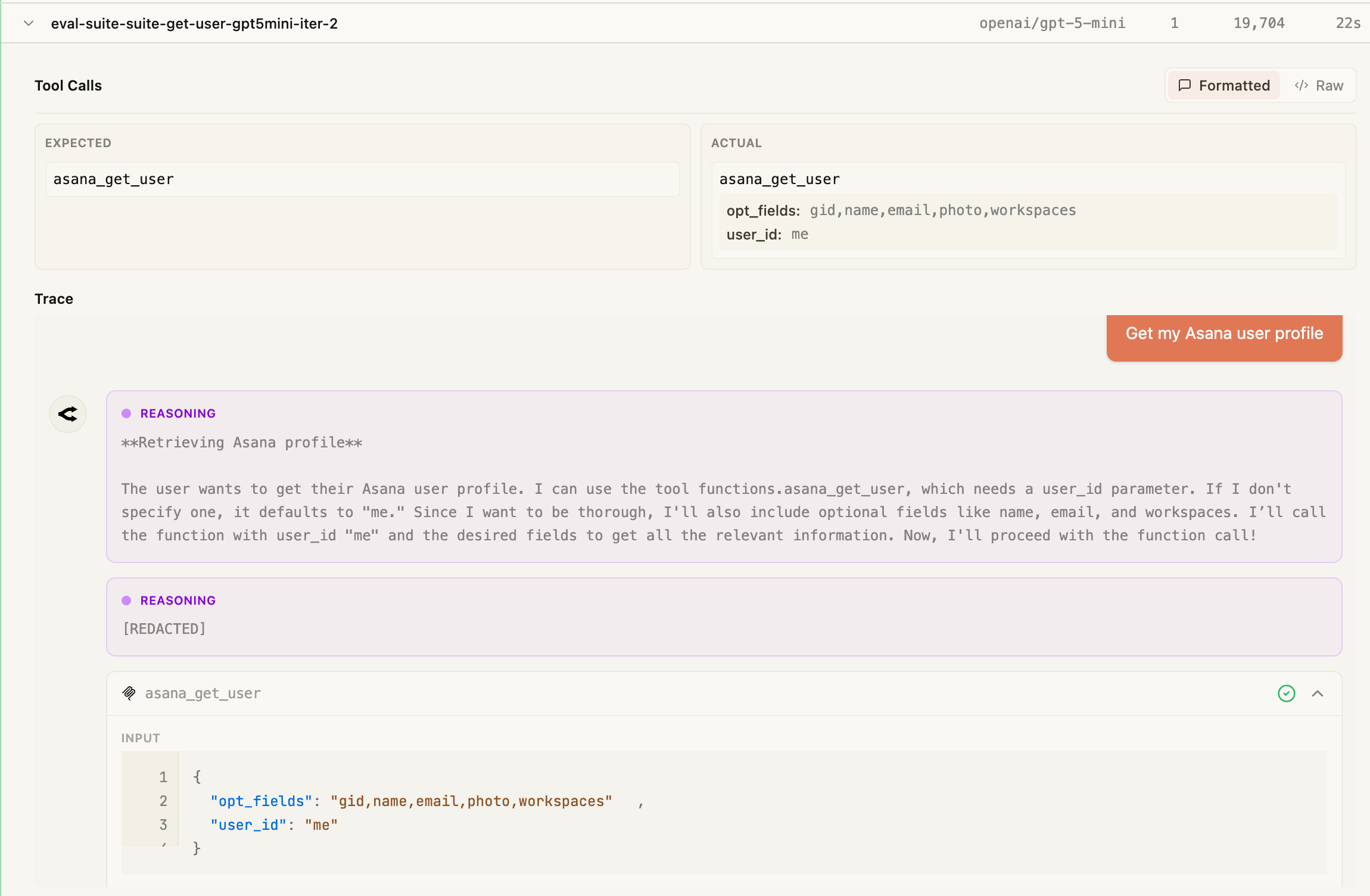
Test case iteration detail showing expected vs actual tool calls and the model's reasoning trace
Next Steps
Running Evals
Learn about EvalTest, EvalSuite, and iteration strategies
Saving Results Reference
Full API reference for all saving and reporting methods